For ID card vendors

From “sir, please send again” to every card printed.

Schools fill in their students on the Datrix app. You check everything on one dashboard, then design and print the cards in Datrix Print. No more photos on chat, no more retyping names from paper.

Scroll and watch it sort itself out
BEFORE
Class 5 · school group214 unread
Sir sending class 5 photos
sorry 2 are sideways, will send again
Kavya's spelling is wrong. Roll 18 missing
class5_FINAL_final2.xlsx
Sir please send again
AFTER
Class 5 A38 of 40 ready
  • Aarav GuptaChecked
  • Kavya MenonChecked
  • Riya KapoorChecked
  • Ishaan VermaChecked
  • Ananya SinghWaiting for details
38 cards ready to print
HOW IT WORKS

One tool, from the school's phone to the printed card.

01

Collect

Schools add every student on the Datrix app, photo and all, even without internet.

02

Manage

You see every school and class on one dashboard, check entries and send back what's wrong.

03

Design

Pick a ready-made card or make your own in Datrix Print. Every student's details drop in.

04

Print

Print sheets or straight to your card printer, class by class, and keep track of every reprint.

01 · COLLECT · THE APP FOR SCHOOLS

Simple enough for any teacher's phone.

SUNRISE DEMO SCHOOL
Hi, Meena212 of 340 students
Classes
Nursery A24 / 24
Class 1 A31 / 35
Class 5 A38 / 40
Class 8 B12 / 42
01

Every class at a glance

Teachers open the app and see which classes are done and who's still missing. Everyone signs in with the school's one code, then their own mobile number, so you know who entered what.

02

Only the details your card needs

You choose the form. The app checks phone numbers and dates as they're typed, and if a student is already in, it says so before a second copy is made.

03

Photos and signatures, done right

After each photo, a quick check: face clear, plain background, not blurry. Signatures are signed on the screen. Retakes happen on the spot, not after printing.

04

Works without internet

Entries wait safely on the phone and go the moment there's signal. Try it: switch the internet on.
FROM THE APP ITSELF
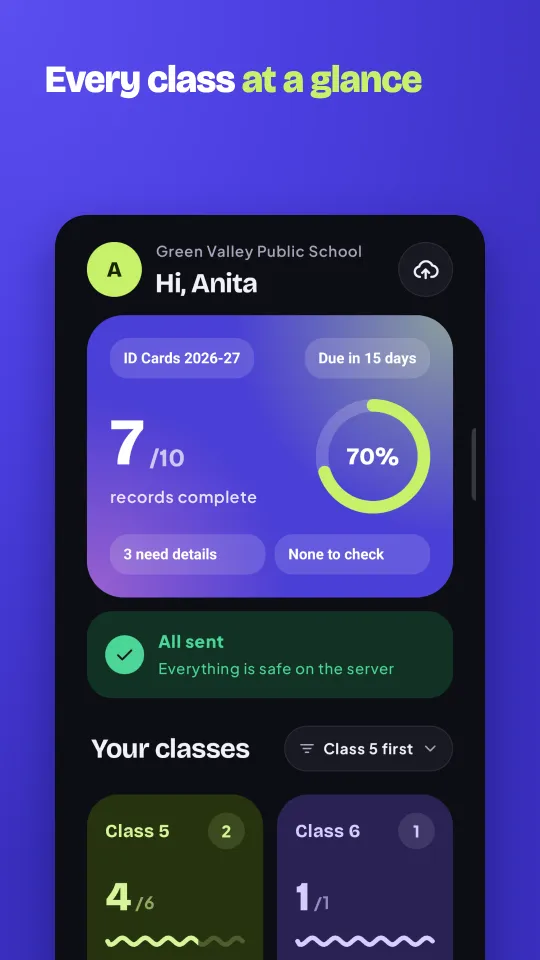
  • The Datrix app's Home: Hi, Anita at Green Valley Public School, 7 of 10 records complete, and each class's progress.
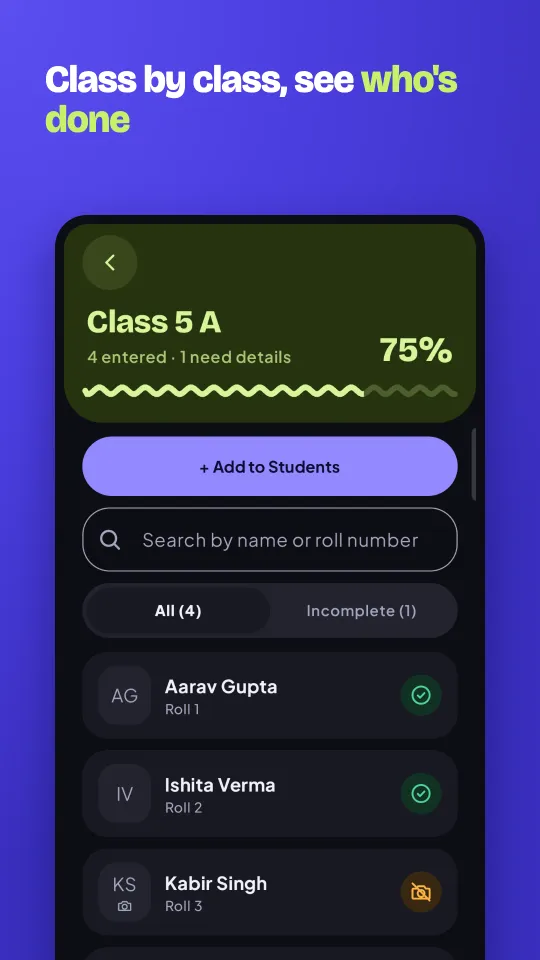
  • Class 5 A in the Datrix app: who's done and who still needs details, class by class.
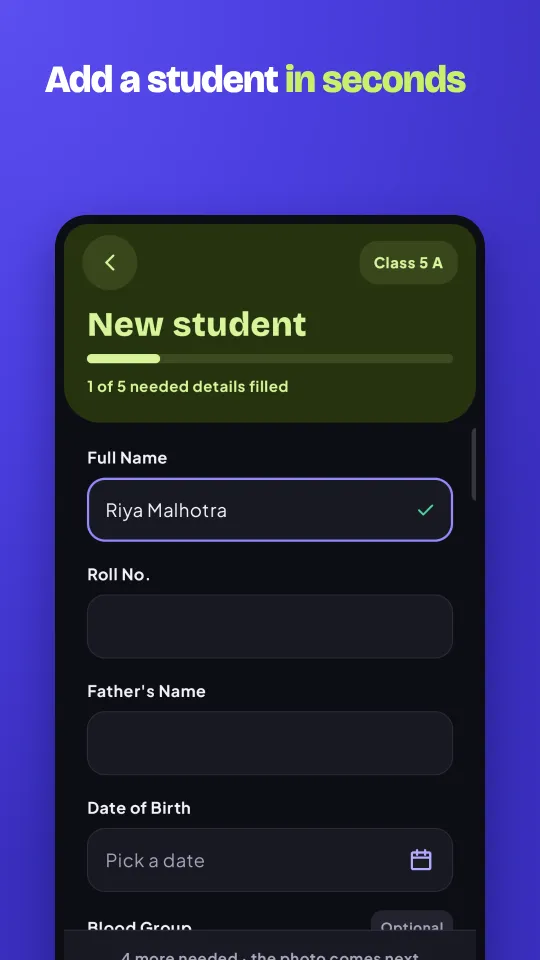
  • Adding a new student in the Datrix app: the form with the details the card needs and the photo.
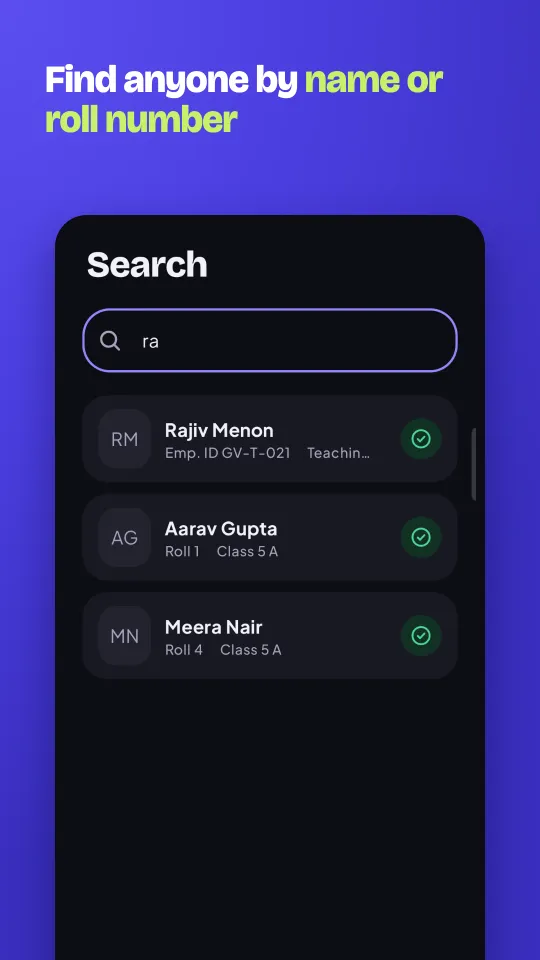
  • Searching in the Datrix app: finding a student by name or roll number.
02 · MANAGE · YOUR DASHBOARD

Every school, every class, before you chase anyone.

Check what each school sent, send back what's wrong with a note, and lock a class when it's right. Your team works in the same place, and Activity says who did what.
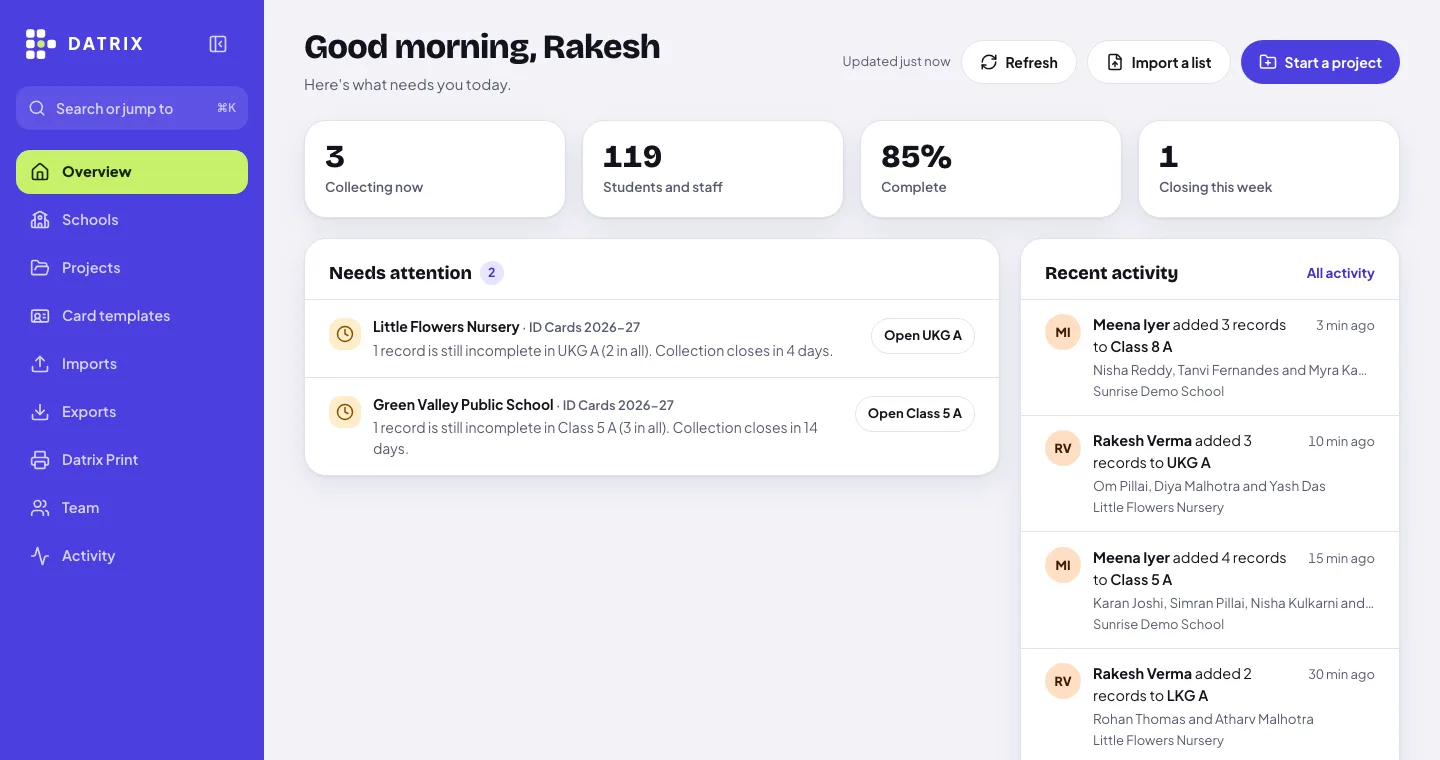
The Datrix dashboard's Overview for Sharma Printers: 3 projects collecting, 119 students and staff, 85% complete, what needs attention, and teachers' recent entries in Activity.
  • Check, then lockGo through each class, send back anything wrong, and lock it when it's ready to print.
  • Bring your photographer's photosUpload a folder of photos and Datrix matches each one to the right student.
  • Export when you need itPhotos with a spreadsheet, in the layout your other card software already reads.
  • Rounds for latecomersNew admissions mid-year? Open another round for them instead of starting over.
03 · DESIGN · DATRIX PRINT FOR WINDOWS

Your card design, filled in for every student.

Start from a ready-made Datrix design or build your own. Names, photos, classes and barcodes drop in by themselves, straight from the details you checked.
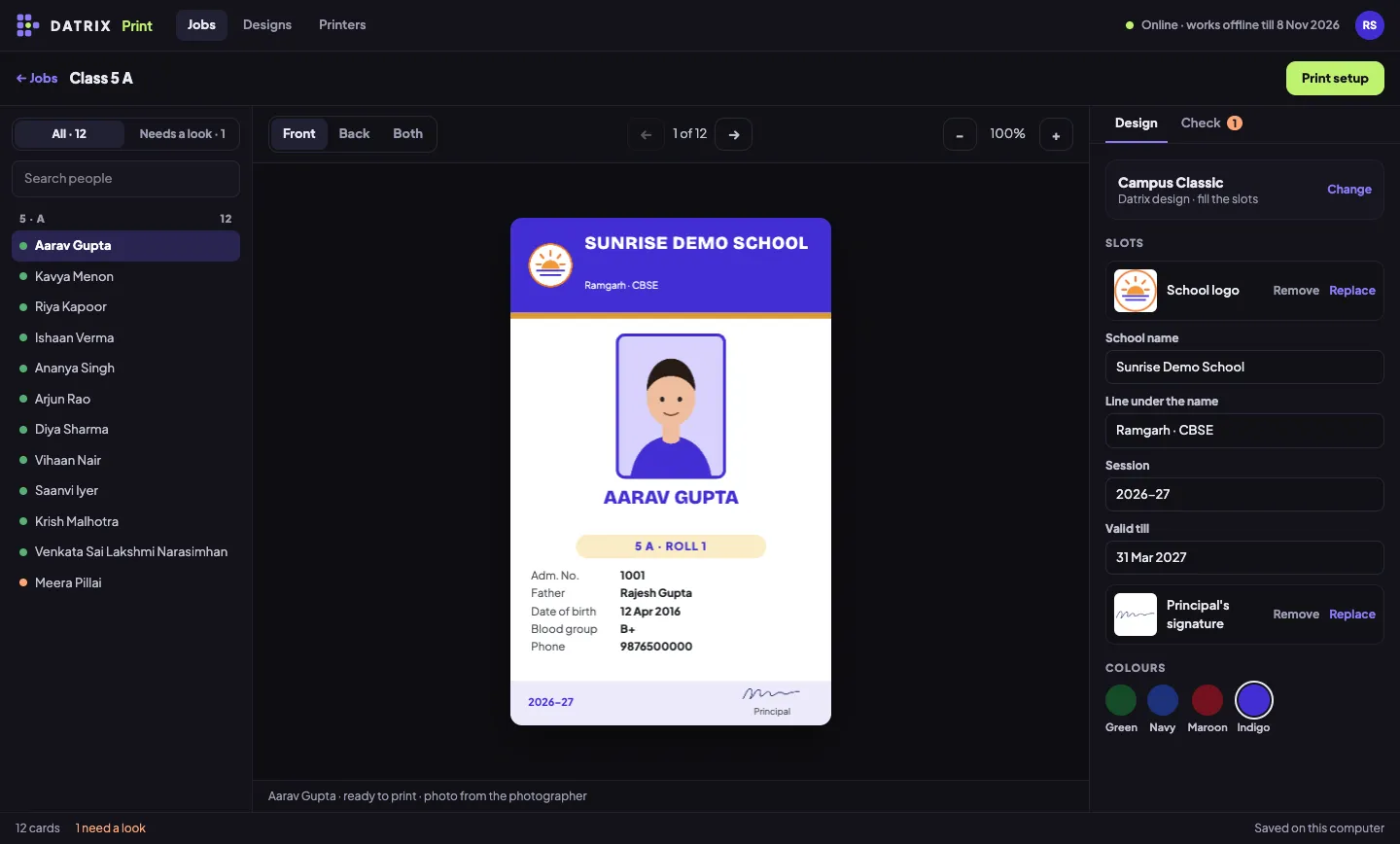
Datrix Print's designer: Sunrise Demo School's card for Aarav Gupta, with the class list on the left and the design's slots and colours on the right.
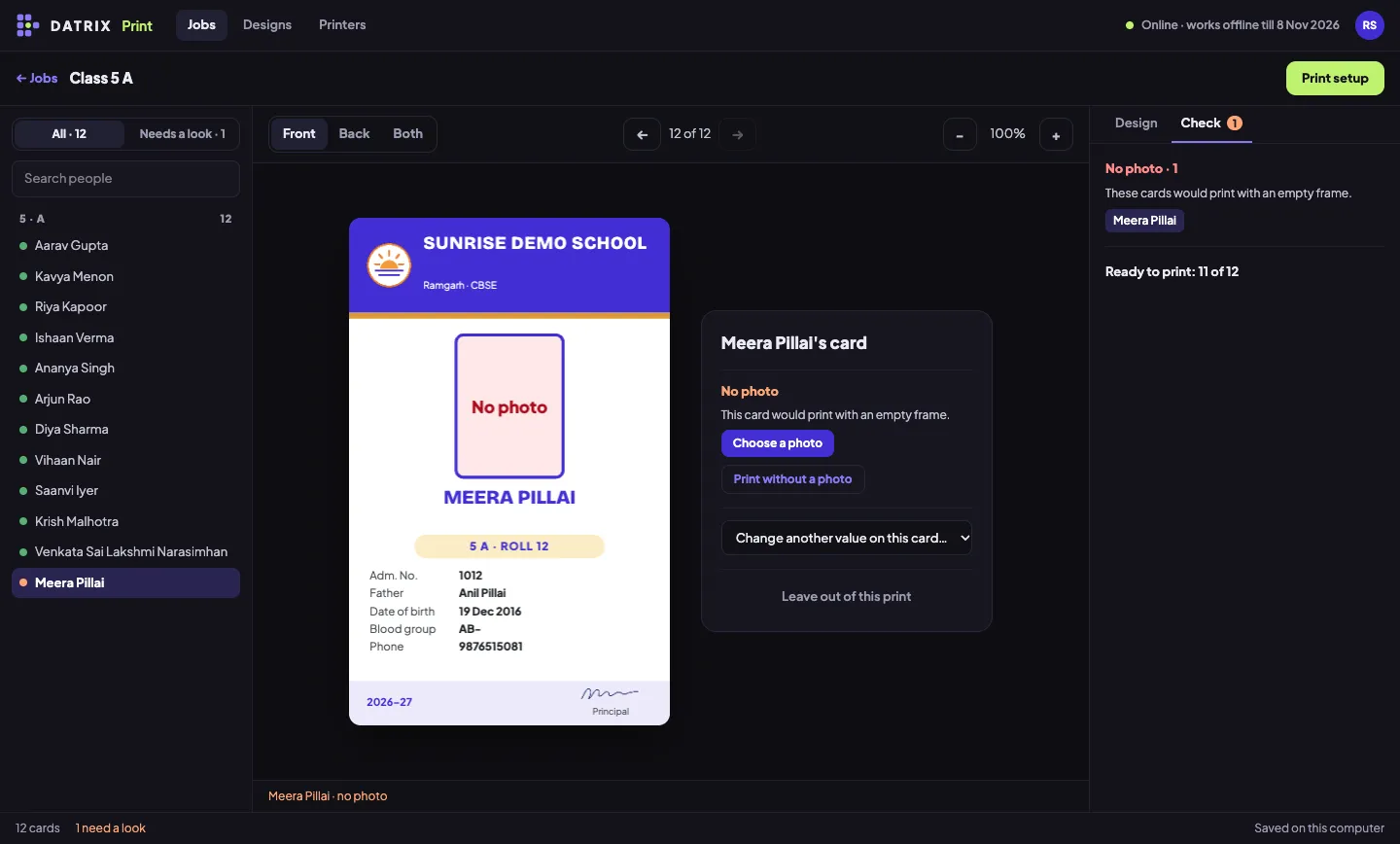
Datrix Print's Check tab: Meera Pillai's card has no photo, with buttons to choose one or print without it.
Checked before you printMissing photos and names that don't fit are listed first, so you fix them once, not after printing.
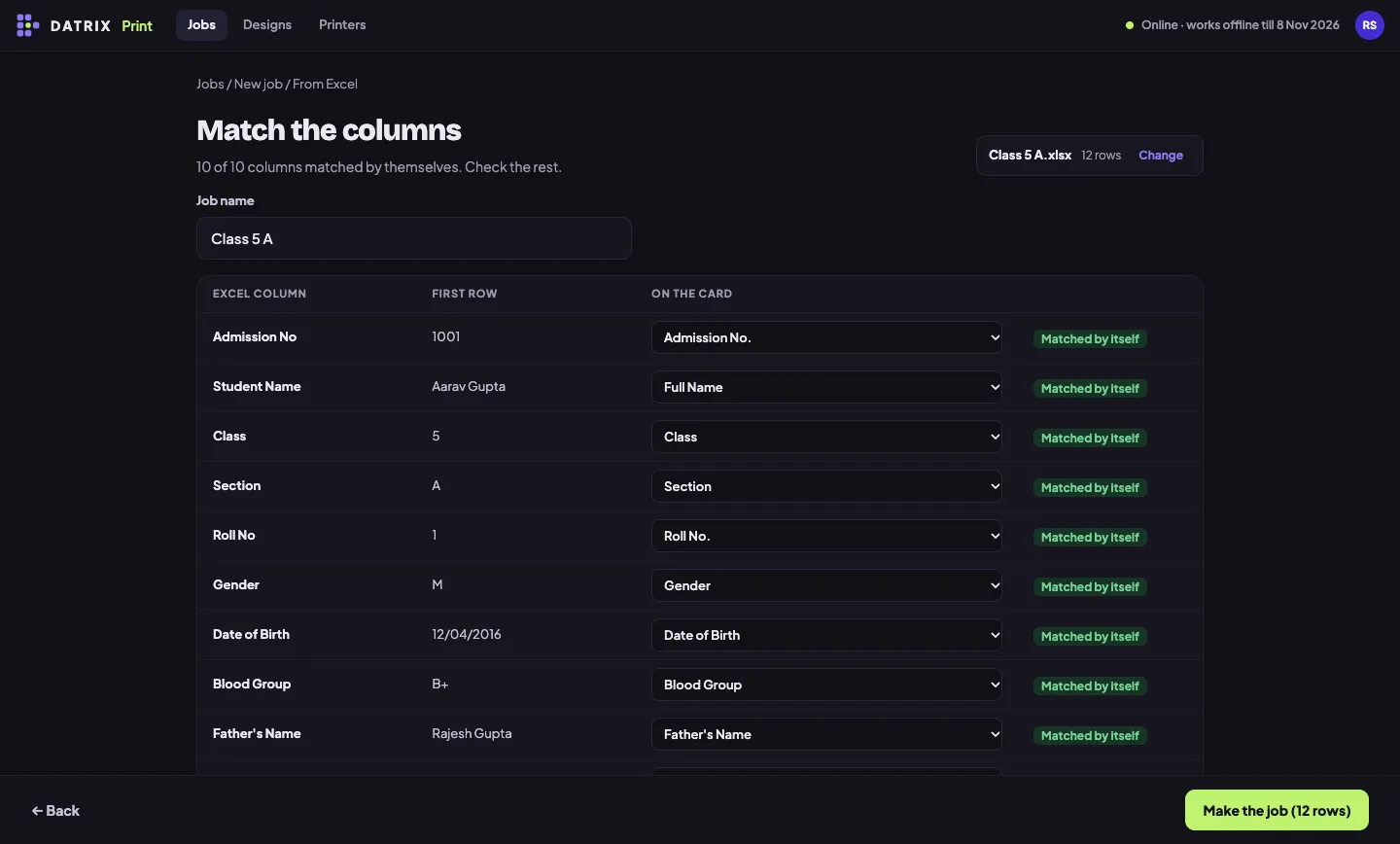
Datrix Print matching an Excel file's columns to the card: all ten columns matched by themselves.
Have an Excel list instead?Datrix Print works on its own too: open the school's spreadsheet and a folder of photos.
  • Ready-made designsPortrait and landscape, for students and staff, with colour sets to match each school.
  • Or build your ownAny font on your computer, QR codes and barcodes, snap guides, front and back.
04 · PRINT

Print class by class, on the printer you already have.

Datrix Print lays out every sheet for you, one PDF per class, and remembers what's been printed.
  • A4 and 12×18 sheets
  • Epson L8050 card tray
  • Card printers
  • PDF for a print shop
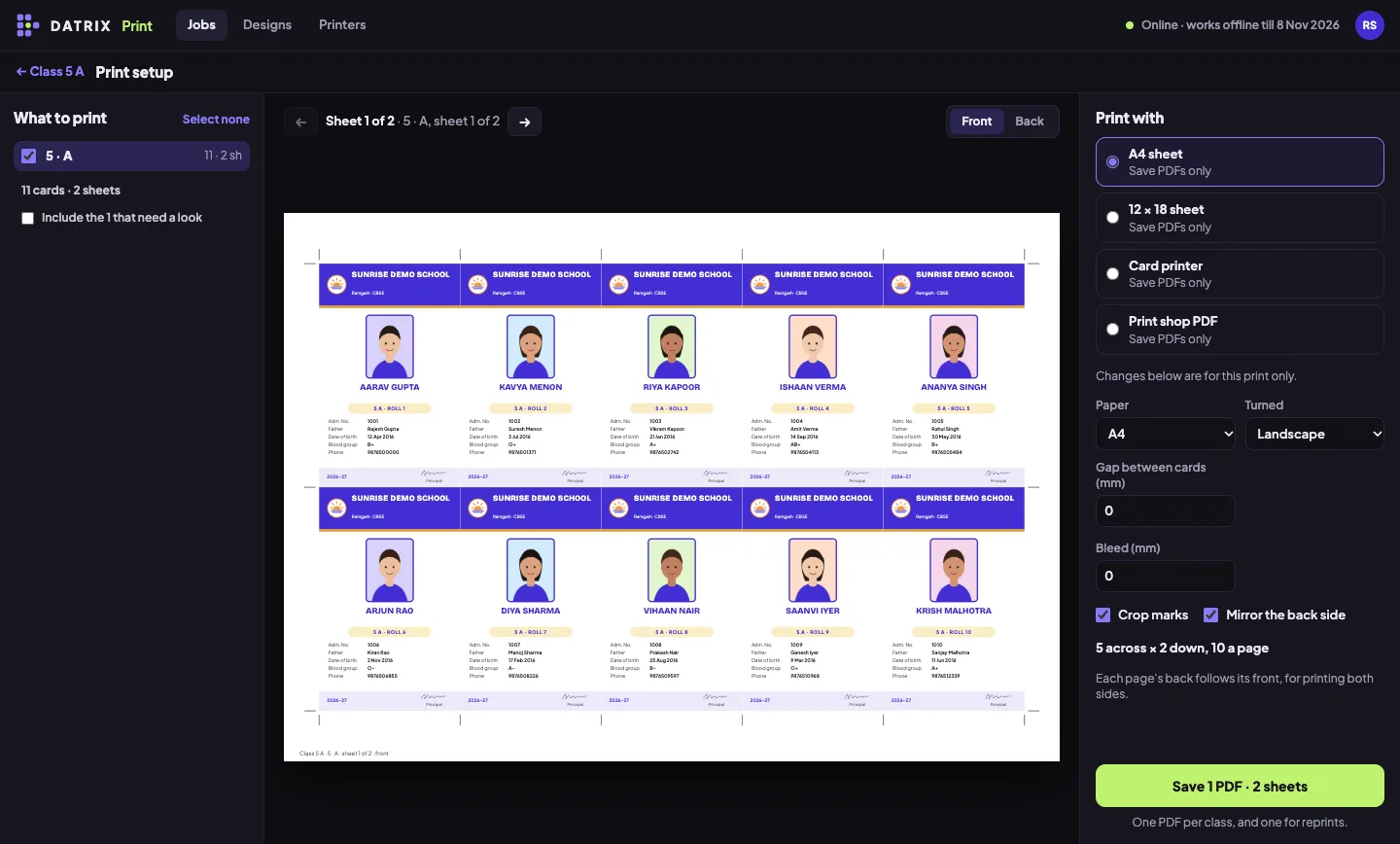
Datrix Print's print setup: an A4 sheet of ten Sunrise Demo School cards with crop marks, and the choice of A4 sheet, 12×18 sheet, card printer or print shop PDF.
  • Crop marks and backs that line upFront and back sheets are mirrored and adjusted for your printer, so double-sided cards match.
  • Reprints with a reasonLost, damaged or a new photo: each reprint is kept, and your dashboard shows what's printed and delivered.
  • Prints without internetOnce a class is in Datrix Print, you can design and print offline for up to a week.
SAFE WITH STUDENT DATA

Children's details deserve care. We built for that first.

Walled off for each vendor

You see only your own schools. The database itself enforces it, not just the screen.

Only what the card needs

You choose the details each card asks for. Nothing extra is collected, and Aadhaar is kept to its last four digits.

Kept in India

Everything is stored on servers in Mumbai, and each entry and edit records who made it and when.

Read the full privacy policy.

GET DATRIX

Three pieces, one account.

  • Datrix appFor schools, on Android 8 and newer. Free for them to use.Coming soon on Google Play
  • Datrix PrintFor you, on Windows 10 and 11. Design and print your cards.Coming soon for Windows
  • DashboardFor you and your team, in any browser. Schools, checking and exports.Log in

Questions

Do schools need to sign up or pay?

No. You set up the school and give it a code. Teachers install the app and sign in with that code.

What if the school has no internet?

The app keeps every entry and photo on the phone and sends them once it's back online.

Which phones does it work on?

Android phones running Android 8 or newer, the phones most teachers already have.

Who can see the students' details?

Only you and your team, and the school's own staff while they're filling it in. Each vendor's data is kept apart by the database itself.

Do I need Datrix Print, or can I keep my card software?

Either. Datrix Print, for Windows, designs and prints the cards straight from the checked details. If you'd rather use your own software, exports give you a folder of photos and a spreadsheet.

Which printers does Datrix Print work with?

Any printer Windows can use: A4 or 12×18 sheets, the Epson L8050 card tray, card printers, or a PDF for a print shop.

How much does it cost?

Talk to us on WhatsApp and we'll set you up for your season.

Ready for this season's ID cards?

Set up your first school in an afternoon. The schools do the typing; you print.